
 Case Study
From Incomplete Planning Artifacts to Reviewable Interface Structure
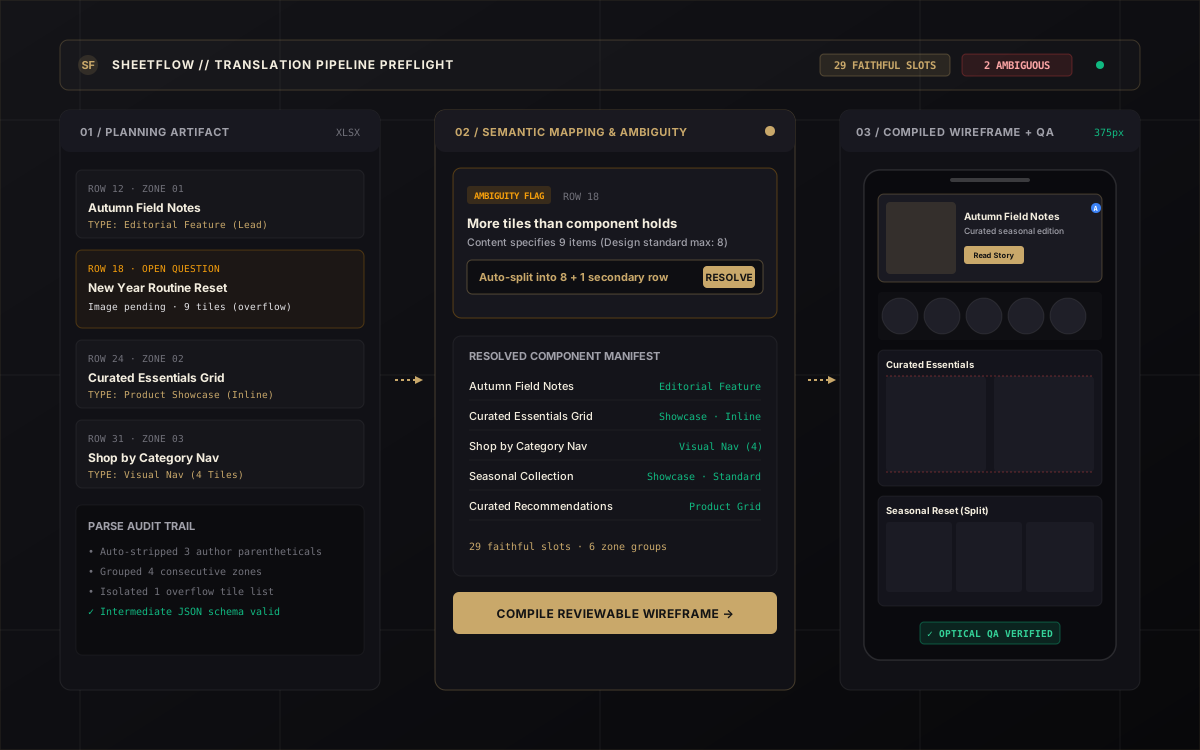
I designed SheetFlow as a designer-controlled translation system for a recurring product-design problem: structured interfaces often begin as incomplete spreadsheets and planning matrices that were never designed to describe UI. It interprets those inputs, surfaces ambiguity early, maps intent to reusable components, and compiles reviewable wireframes with optical QA.
- Semantic translation layer separating intent from components
- Preflight ambiguity review surfacing missing assets and overflow
- Optical QA verification for spatial baseline and token consistency
The Spreadsheet Was Never the Interface Specification
Planning spreadsheets can be fast and familiar for cross-functional partners while still containing shorthand, missing hierarchy, incomplete intent, inconsistent labels, ambiguous component expectations, and an order that describes content inventory rather than interface structure.
Designers spend countless hours manually parsing shorthand cells, checking undocumented widget names against design libraries, manually re-typing titles, and catching layout overflow errors late in the cycle. The friction is not drawing rectangles—it is interpreting raw intent into valid, extensible system components.
“The expensive step is not drawing rectangles. It is translating intent into a system that can be reviewed, built, and extended.”
Meaning Before Implementation
SheetFlow establishes a rigorous linear compilation pipeline: raw planning inputs are parsed into a normalized intermediate schema, evaluated for semantic ambiguity, compiled into ordered wireframe structures, and verified for optical quality before human approval.
Planning Input
Spreadsheets & content matrices with author shorthand.
Parse & Normalize
Extract raw cell values, clean labels, and strip formatting noise.
Semantic Interpretation
Map intent to normalized component families and variant properties.
Ambiguity Review
Surface open questions, missing assets, and overflow before build.
Component Mapping
Bind validated slots to published design system component sets.
Wireframe Compilation
Assemble ordered vertical frame hierarchy with auto-layout.
Annotation & Optical QA
Verify alignment guides, padding bounds, and implementation notes.
Designer Approval
Human designer retains ultimate authority to approve or refine.
The Hard Part Was Never Drawing the Wireframe
SheetFlow cleanly separates meaning from implementation. It translates informal planning rows into an unambiguous semantic interpretation before binding them to specific UI components.
A typical planning cell contains mixed signals: content category, copy title, pending asset states, and suggested interaction goals.
| Semantic Field | Public-Safe Interpretation |
|---|---|
| Section role | Editorial feature |
| Primary content | Image-led story |
| Title | Autumn Field Notes |
| Action | Primary action button |
| Unresolved item | Image asset pending delivery |
| Review state | Needs designer decision |
Once the semantic meaning is extracted, SheetFlow maps the row to a neutral component family such as Editorial Feature (with properties: Grid style: Standard, Image: Inline, CTA: Primary). The designer no longer has to reconcile basic property mismatches row by row.
The System Does Not Get to Pretend It Knows
Most automated tools fail by guessing silently when inputs are incomplete. SheetFlow enforces a preflight surface where uncertainty is made legible and reviewable before any wireframe is generated. Interact with the controls below to resolve or defer flags in real time.
Approved Meaning Becomes Ordered Interface Structure
Once ambiguity is resolved, SheetFlow compiles the structured intermediate into an ordered, responsive wireframe equipped with an explicit presentation annotation rail.
Editorial Feature with inline imagery to preserve high visual contrast.Correct Components Can Still Produce a Bad Page
Even when every component is mechanically valid, spatial rhythm, padding inconsistencies, and misaligned baselines can degrade the user experience. SheetFlow adds an assisted optical quality layer.
Without Optical Validation
Calibrated Spatial Rhythm
Automation Stops Where Judgment Begins
SheetFlow does not attempt to automate creative taste. It moves designer attention away from repetitive transcription and toward the decisions that actually require design judgment.
“Move designer attention away from repetitive translation and toward the decisions that actually require design judgment.”
Transferable Systems Proofs
“Automation becomes valuable in design not when it makes more decisions, but when it makes the structure around those decisions more explicit.”